Wys tans plasings met die etiket household. Wys alle plasings

Donderdag 12 Desember 2013

Cut Your Losses: Screening the Floor Vents

The vent screened with pink tulle.
Yesterday, I heard screams coming from my daughters' room. This isn't really a surprise. When people talk about boys being loud, I always wonder how girls ended up with better publicists in that department.

So, as the cries didn't indicate blood loss or actual fear, I ambled back to see what was the matter.

My girls were playing with poker chips (a favorite toy at our house) and the baby inserted one in the floor vent- to her utter delight and the complete irritation of sister Scout.

Now, I've known for years that their floor vent was a gaping maw hungry for toys and tidbits. It's one of the few floor vents that the previous residents didn't cover with window screen.

When I went to recover the chip, it was gone. It made it past the initial flat land and rolled somewhere toward the basement. For all I know it's now sitting on the electric coils of our furnace. Since they got past my arm's reach, this was no tea set spoon scenario; this situation required action.

I grabbed some very pink tulle and cut it about 5 inches larger than the floor register. This register fits pretty snugly into the floor, so I didn't bother duct taping the tulle around the boxy underfloor part of the register (as the previous residents had on the other vents). The next vacuuming may prove that to be a strategic error, but for now, it's keeping all the chips out of the furnace and the girls like their pinker floor vent.

***Baby Toolkit is the slapdash meanderings of a couple geek parents raising three active kids. When we're not searching floor vents for lost treasure, we're sometimes discussing board games at Great Big Table (mmm, delicious podcasts!). We're Amazon affiliates, so clicking through our relevant links and purchases increases the Jones' coffers. We don't have any vested financial interest in tulle, floor registers or poker chips. Do you?

Dinsdag 30 Julie 2013

Conserve Your Energy (and Your Home's) with Bathroom Fan Timers & DewStop Condensation Sensor

Earlier this summer, I finally noticed a pattern in my evening routine. At the end of a long day, after climbing into bed and settling my head on the pillow, a mechanical growling would emerge from the house's nighttime quiet.

Someone left a bathroom fan running and, for all I wanted to ignore it, our climate-controlled air was being siphoned off into the night (and had been for hours). I could either try to ignore the situation (though it felt as wasteful as leaving the fridge door open all night) or get out of bed and turn it off.

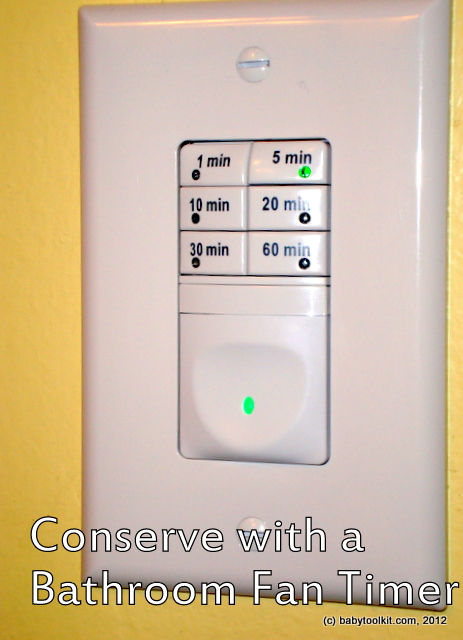
A separate trip to the hardware store brought me to the solution: a bathroom fan timer (Pass & Seymour's 7 Button Timer, ~$30). With an engineer dad and a teacher mom, I have been involved in home maintenance and improvements from an early age. The timer switch installation didn't seem much different than replacing a regular light switch, so I bought a model with automatic shut-off after 1, 5, 10, 15, 30, or 60 minutes.

With the kids napping and Dad on the phone, I installed the timer in our highest traffic bathroom.

Almost immediately, I noticed far fewer trips into the bathroom to turn the fan on or off. The kids liked using this switch, so they were happy to deploy it as needed (which had not been the case before), and the fan reliably turned itself off. Jim liked it so much that he asked that I put one in the downstairs bathroom.

The next day, GTR Technologies Inc. contacted us about reviewing their DewStop condensation-sensing fan switch with automatic shut-off. I had never heard of such a switch, but it seemed quite appropriate for a basement bathroom where the shower is used regularly.

DewStop (in center,with blue light) installed between
existing light switch and outlet. Top panel has sensor and LED,
middle button is manual on, and lowest button is manual off.
They sent me the DewStop FS-100 (presently selling for about $48 on Amazon). The installation was almost identical to the timer switch I had already installed. It took me less than half an hour from start to finish (the switch is in a multi-switch junction box, so it took me a little longer to arrange all the wiring and the switch controls into the box and level the switch so it fit under the face plate.

Now, if someone starts showering without the fan on, the switch activates the fan when the humidity reaches it. Our bathroom is long and narrow with the shower and fan at opposite ends of the room and the shower has doors rather than a curtain. This architecture means some humidity accumulates in the shower stall before the fan activates.The humidity is minimal, and dissipates soon after the fan is triggered. Also, the occupant can manually switch the fan on before taking a shower. As when the fan is triggered by the sensor, the timer will turn the fan off after 30 minutes. Both the DewStop and the variable timer have manual off buttons.

The condensation sensor seems most valuable in a bathroom where teens or adults regularly shower. Foggy mirrors and damp walls could be mostly avoided (distance between the switch and the shower may mean a little fog on the mirror right after showering). Jim observes that the switch is great for a guest bathroom because guests won't have to remember to start the fan.

We really like both timed switches. I'm always a little surprised when I realize that the run-time interval has already passed (whether it's 5 minutes upstairs or 30 downstairs). I hate to think how long the fans were previously left running before we turned them off. I can't speak to energy savings as I installed them at the beginning of this heat wave, but I'm sure the fans are running less with the timed switches (even with a 30 minute duration).

And, best of all, when I climb in bed at night, if I hear a ventilation fan running, I know it will turn itself off without my assistance. I love automation.

***Baby Toolkit is the collected reflections and independent opinions of some geek parents in the middle Midwest. Though we know one end of a screwdriver from the other, we're not electricians. While we received a free DewStop from GTR, we're under no obligation to mention it on the blog (much less say anything nice). We have no financial relationship with GTR or Pass & Seymour. We are Amazon affiliates, so a portion of purchases through our links helps cover the blog's overhead. We also podcast about board games at GreatBigTable.com.

Vrydag 07 Junie 2013

Keeping on Track: Log Medicine Doses on the Bottle

I taped this label above the pharmacy label.
In the past year, our household has taken more medicine than ever. It seems at least one of our kids has needed a course of medication at least once a month for the past calendar year.

This is a lot for my tired mind to manage, so I've stolen and consolidated a number of smart tips from Parent Hacks. Now, I reveal to you our household's approach to medications.

I put a blank mailing label, post-it, or piece of paper on the actual medication. I don't ever cover the Rx label with anything I can't easily remove. I write the dosing instructions in easily read letters on either the bottle or the top of the paper (Sharpies don't work on all bottles- especially cold ones).

On the bottle or paper I keep a log (day, date, and time) of doses given.

I used to keep a separate log on the front of the fridge, but I always forgot to update it when I gave the dose. Now, I have the log in-hand as soon as I grab the bottle.

The on-board log makes it a lot easier for others to track, avoids double-dosing, and travels with the medicine automatically. It also keeps things clearer when more than one kid needs medicine (I then write their name on the sheet too).

How do you organize your household's medicines?

***Baby Toolkit is a stream-of-consciousness parenting-related log written by a geek couple from the almost-rural suburbs on a big, blue spinning planet about 93 million miles from the Sun. We are affiliated with the Sun (as users) and with Amazon.com (as affiliates). We are also podcasting about board games at GreatBigTable.com.

Maandag 29 April 2013

All Bottled Up: Safe Battery Disposal

With growing concern about button battery ingestion, I thought I would post this incredibly obvious simple hack for battery disposal.

While this solution doesn't address the problems of button batteries while in use in everything from greeting cards to remote controls to toys, it does keep the old batteries corralled until they can be recycled or disposed of properly (call your local solid waste district or trash service for more information).

We drop our dead batteries in a child-safe vitamin container, and put the containers out of the kids' reach. I relabel the containers solely for my own amusement (Do you do this? Maybe we should start a Pinterest board).

The filled container is deposited at our wonderful local recycling facility (which accepts a broad array of batteries in a co-mingled bin).

Not only does this hack keep our batteries away from our little kids and out of the solid waste stream, it also means that batteries outside the bottles are easily identifiable as fresh.


***Baby Toolkit is a frontrunner in observing the obvious and the ridiculous in parenting. It is written by two geek parents presently enjoying a Fall-like Spring somewhere slightly above the Mason-Dixon line. Although we make no links in this post, we are admittedly Amazon affiliates, so a portion of purchases made through our Amazon links fuel our pipe dreams of owning a bathtub with a water slide (thank you!). Our actual voices (and sordid secrets) can be heard on our board gaming podcast GreatBigTable.com.

Donderdag 21 April 2011

Quick Change Artists: DIY Playdough Playmats

My artists: chaos & control
My kids love Play-doh, but I dislike the million multi-color crumb clean-up.

I cut some lengths of freezer paper (size corresponding with age and messiness) to use as perpetual playmats.  Waxed paper or parchment would serve equally well.

When playdough interest wanes and the dough is tucked back into cans, I shake the papers over the trash can and many of the wee nuggets are vanquished.

It is not a perfect system.  Some days the bottoms of my socks still look like they have a Seussical pox, but the slick paper playmats cut clean-up time substantially.


***Baby Toolkit is a collection of hacks, coughs, and observations from a couple geeky Midwestern parents.  We're Amazon affiliates, so a portion of purchases made through our links goes toward our dreams of a giant Batsignal spotlight.

Vrydag 19 Februarie 2010

E.T. can now phone home or cell: VTech DS6321-3 simplifies life

In the fall our cordless phone's battery life finally flatlined. Its standby time made the life of a gastrotrich look epic. The very weak signal made all our (very short) phone calls sound as if they were happening on a highly trafficked heliport.

I bought another phone. A lovely system with 3 handsets, a base with answering system, and two charging stations. Now I could grab a cordless phone downstairs, in the kitchen, or in our room. I settled in for a new age of convenience.

But my cell phone kept ringing, especially when both kids napped and I was finally settling in with a book. The easily accessed cordless phone was impotent when a persistent, child-waking wail was coming from a coat pocket, somewhere in my backpack, the kitchen counter, or wherever the young agents of chaos has decided to place it.

Mr. Pavlov would be amused to see me drop whatever I was doing and sprint around the house on a frenzied scavenger hunt to make the bells stop ringing. If I was downstairs, the phone was upstairs (or vice-versa). If the phone and I were in close geographic proximity, it would be usually be hidden in some crazy Russian stacking doll arrangement of bags, pockets, and or toys.

Usually, when my hand made contact with the phone, it would immediately stop ringing. I used to make the rookie mistake of checking the display and attempting a return call, but before I hit send my home phone would begin ringing- far,far away. Let the games resume.

About the time I started leaving the cell phone in the car, VTech offered us a chance to review their new cordless phones. When I skimmed the email, their DS6321-3 looked like a direct competitor to my existing phone. As I was about to hit delete I noticed the phone's killer apps: it connects by Bluetooth with up to two cell phones AND it imports cell phone directories.

The review phones from VTech (retail value $100) have been our primary household phones* for a month. My naptime sprinting scavenger hunts have ended.

As long as a cellphone has Bluetooth activated and is within 30 feet of the base, any handset can receive incoming and make outgoing calls. The Bluetooth radius includes our upstairs kitchen and living room as well as the entry area downstairs where I often leave my coat. If I'm downstairs doing laundry, I can easily answer my cell phone when it's in my bag upstairs. If everyone is napping, and my coat is ringing downstairs I can answer it two places upstairs. My sprinting skills can now being applied to important things like wolf attacks and glasses of juice poised on the very edge of the table.

Proximity of the cell phone to the base can affect call quality. When the phone is nears the outer reaches of Bluetooth communication voices began to sound robotic and signal noise increases.

As new users of Bluetooth, we were surprised by how much it shortens the life of each battery charge. I often put my cell phone on a charger (which I'll review soon) when I'm home to counteract the constant Bluetooth power draw. There's nothing different about power use with VTech, but it is a factor to consider if you're considering this system as your first Bluetooth device.

Each handset can also set the ringer volume for the whole system and retrieve messages from the answering machine on the base.

I put a call on hold (cell or home) to answer or make an outgoing call on another phone. The handset displays caller id information from the cell phone.

Cell phone directory import is really helpful. The cell directories are saved in the system and can be accessed even when the cell phone is not connected to the system.

Jim's LG VX8360 imported flawlessly. My Nokia 6205 (no, we're not smartphone people) only imported the numbers but didn't import the names or number types (e.g. home, cell, work). After a call to tech support, it turns out my phone is incompatible with the system. A few of the compatible systems are listed on Vtech's website, but prospective purchasers might want to call Vtech (800)595-9511 to check compatibility of unlisted phones. Even with the import snafu, I was able to update the entries manually without retyping all those phone numbers. For me, it was a worthwhile effort.

Accessing the cell directories feels cumbersome as a user must navigate a few screens to make a call.

Dialing from the cell directory on the land line was a bit confusing as first. The numbers show as area code and seven digit phone number. The phone doesn't recognize whether it is a local or long-distance number and will dial (xxx)xxx-xxxx if you press send. Neither long-distance nor local calls worked as listed in the cell directory when making calls on the home line. After looking at the manual it turns out the user can toggle between all multiple dialing options with the # key. One press on # makes it long-distance dialing [1(xxx)xxx-xxxx]. Two make it local (xxx-xxxx). Three make it intra-area code long distance (1-xxx-xxxx). Four returns it to the cell listing.

The handset's speakerphone function is really handy while multitasking. Good hands-free function means I can laugh with a good friend while chopping vegetables or type two-handed when I need to look something up. Speakerphone also means the baby can say hi to Grandma without hanging up the phone and that Ranger can tell Jim all about preschool without holding a cordless or cell phone to their head. Recent information on phone radiation and kids makes me wary of them holding any wireless handset to their heads.

The VTech DS6321-3 also allows for the connection of Bluetooth headsets (which emit far less radiation then cordless and cell phones). There are no jacks on the handsets for wired headsets.

The two remote chargers only require an electrical outlet, so they can be placed regardless of phone outlet availability. Because of the phone's digital nature, we put the base and charge stations on surge protectors.

The handsets are compact, but they lack a clip or other hands-free carrying option.

Summary:
We really like the VTech DS6321-3. The simplicity of receiving calls from two phone systems on the same handset removes some stress and chaos from our home. Not having to look up phone numbers on the cell is handy.

The speakerphone options make it possible to take a call and change a diaper at the same time.

It was disappointing to have only a partial import of my cell directory, but even the limited data saved me time in creating a tool I use daily. With compatible phones the import is fast and easy.

We're impressed with how many things the handsets can do. The phone would be improved by a quicker method of accessing cell directories, but the handset menus are generally well designed.

On our long term wish list, I would like to see VTech move toward lower radiation DECT phones which eliminate or reduce broadcast signals when the phones are not in active use. Then they can add a belt clip.

*We always keep an old-school wired phone on our land line, and we strongly recommend that everyone have an unpowered land-line phone which can operate in power outages and emergency situations.

***Baby Toolkit is the independent opinion of geek parents who do not miss their impromptu sprinting, hurdling, and vaulting workouts provided via modern telephony. We received a VTech DS6321-3 phone (MSRP $100) from Vtech's press agents, but we have no financial, emotional, or other notable relationship with VTech or its affiliates. We are Amazon affiliates, so we do receive a small portion of purchases made through our Amazon links.
(c) Baby Toolkit 2010.

Maandag 26 Oktober 2009

Out D*mn'd Spot: Another Great Stain Fighter

I love shopping second-hand with Mimi-n-Moe's Mom. We were at a rummage sale when she commented on how beautifully stain-free a seller's kids' clothes were. This scored us the best find of the day.

The mom uses Dawn dish washing foam to remove stains. If she cannot hand scrub the stain out with Dawn alone she adds a little baking soda "and that takes out most anything."

While I still often use Dial bar soap for a stain-remover, this is one hot tip. Dawn works quickly, and stains take less time to remove. If using a front loader or other high efficiency washer, wash the Dawn out thoroughly before laundering.

I've tried Dawn and baking soda against some stains that went through the dryer and while it lightened the stains considerably it did not fully remove them. I've placed the articles in direct sunlight to see if the remaining stains fade out, but we haven't had many sunny days lately.

***Baby Toolkit is not affiliated with Dawn nor its parent companies. We aren't laundry professionals though we're well on our way to the 10,000 hours required for mastery. Not to brag, but we seem to be naturally gifted in the field of entropy.